
Copywriter Portfolio Figma Template with Vibrant Grid UI
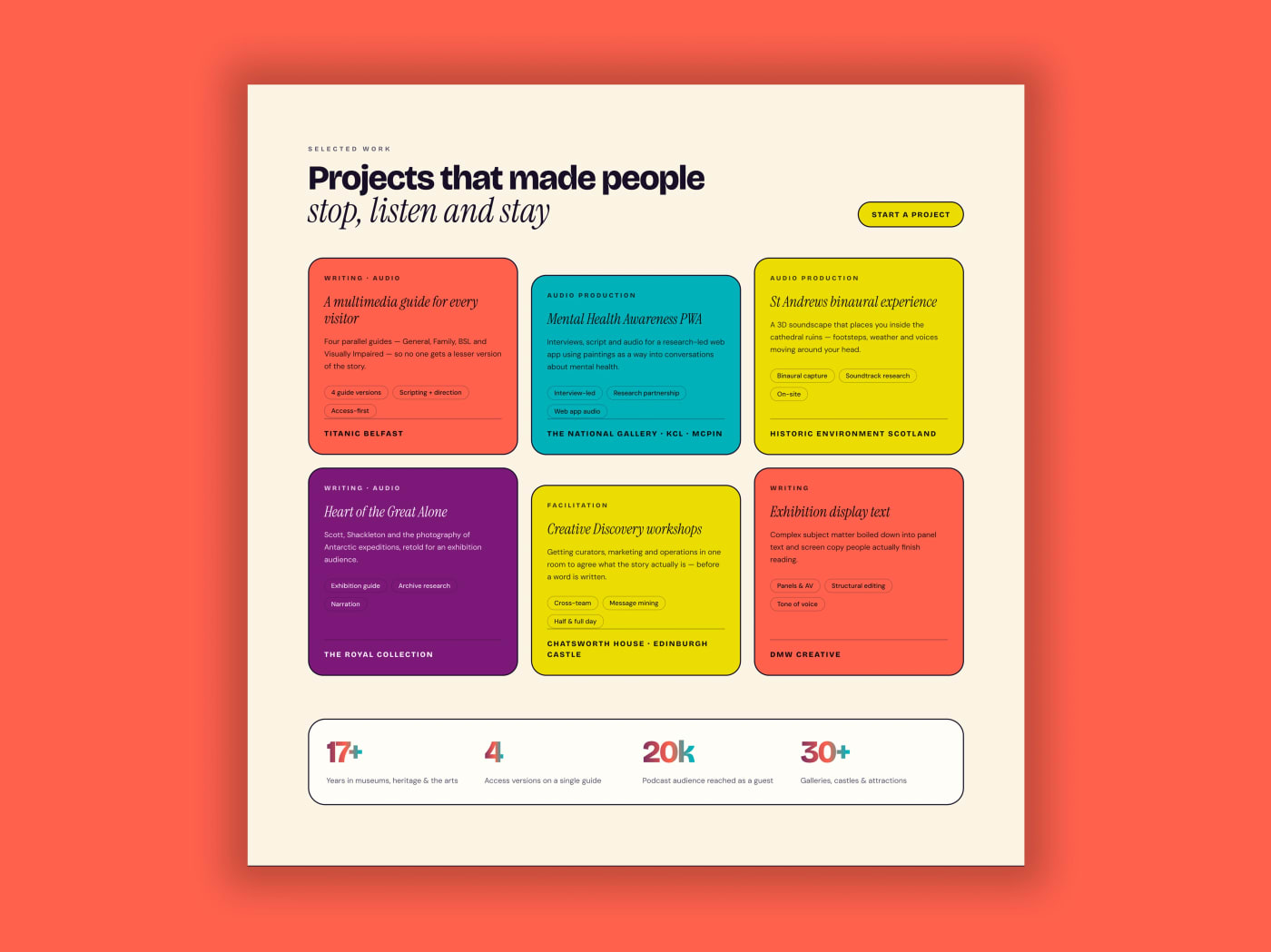
This copywriter portfolio figma template provides a vibrant portfolio section designed for creative professionals and boutique agencies. It uses a creamy background to set off a highly structured layout that organizes your best work into a clear and readable format. The typography relies on a smart mix of bold sans serif headings alongside elegant serif italics to establish a sophisticated editorial feel. Designers looking to present written or visual case studies will find this structured approach extremely practical. A strong portfolio needs to present both the visual appeal of a project and the context behind the work. This design achieves that balance perfectly. The high contrast layout draws attention exactly where you want it while the strict grid keeps everything organized.
What Is Included in This Template
- Section header: A prominent header area featuring a bold main title and a clear call to action button to capture visitor interest immediately.
- Project cards: A three column grid displaying individual projects in bold colors like coral, teal, yellow, and purple to differentiate each case study.
- Metadata tags: Internal tags placed inside each card to present specific project details and categories clearly.
- Stats container: A rounded container positioned at the bottom of the section to highlight project results and scope.
- Metric counters: Large colorful typography used within the stats container to display key numerical outcomes clearly.
Design Style and Layout
The color style leans heavily into a vibrant retro pop aesthetic. Bold solid colors including bright coral, deep teal, vivid yellow, and striking purple contrast sharply against a warm cream background. Thin black borders surround the cards and internal elements to give the entire section a distinct bento box feel. This high contrast approach ensures that every individual piece of content stands out while maintaining strict alignment and visual hierarchy across the grid. You can easily adapt these colors to fit your own brand guidelines while keeping the distinct borders intact. The use of thin black strokes around the project containers adds a precise architectural quality to the design. This prevents the vibrant palette from overwhelming the viewer and keeps the interface grounded.
Typography drives the editorial tone of this layout. The combination of heavy sans serif fonts for primary titles and elegant serif italics for accents creates a rhythmic reading flow. Visitors scan the large bold headers first before digesting the finer details inside the structured project cards. The three column grid breaks down complex case studies into digestible visual chunks. The full width stats banner at the base anchors the section and provides a definitive visual conclusion to the portfolio showcase.
Who Is This Template For
- Creative agency portfolio: Teams needing a bright and structured way to display diverse client campaigns.
- Freelance writer website: Individual writers who want to present their written copy with the same visual impact as graphic design work.
- Audio producer showcase: Producers displaying podcast episodes or commercial sound design projects with clear categorization.
- Boutique design studio: Small studios that prefer a retro pop aesthetic with sharp borders and distinct color blocks.
Technical Details
This template is built entirely with Figma Auto Layout to ensure the three column grid and internal card elements scale perfectly across different screen widths. All layers are named and grouped logically to make handoff and editing straightforward. Image placeholders are clearly marked inside the project cards so you can swap in your own case study thumbnails instantly. Figma Variables are used to manage the bold solid colors and cream background efficiently. The structured layer setup means the file is ready for Dev Mode handoff the moment you finish your edits. Managing your content updates is simple when the foundation is structured properly. You do not need to worry about manual resizing when you add a new metadata tag or change a metric counter.
Download this free asset and open it directly in Figma to start building your new portfolio layout.